Start with
the free option.
This compares FX Blue Live account analysis with TradeFXBook; scroll sideways on small screens.
Start with FX Blue Live if your main need is free MT4/MT5 account statistics or published results. A paid journal needs to add something useful beyond that existing job.
TradeFXBook is worth considering when the gap is trade context and a repeatable review. Its notes, screenshots and tags support the written record; paid plans add sync and weekly AI reports. Elite adds replay practice. Choose around the work you will do after the account data arrives.
| What matters | TradeFXBook | FX Blue Live |
|---|
| Starting cost | Free $0: 15 manual trades/month, latest 15 in history | Free web-based account analysis and publishing |
|---|
| Paid journal plans | Pro $12.99/month or $128.99/year
Elite $22.99/month or $238.99/year | FX Blue Live is free |
|---|
| MT4/MT5 account data | Pro: 3 auto-synced accounts
Elite: unlimited
Includes prop firm accounts on MT4/MT5 | Publisher tools, including MT4/MT5 EAs, or automatic account sync without an installation |
|---|
| Review focus | Trade notes, screenshots, tags and performance analytics | Trading history analysis, statistics and risk views |
|---|
| Sharing results | Trade share cards and journal PDF export | Publish account results, embed widgets or read headline data through APIs |
|---|
Checked 19 October 2026. TradeFXBook prices are USD; annual plans are billed once per year. Official competitor source: FX Blue Live account analysis, connection methods and publishing tools. This comparison does not cover every FX Blue product. TradeFXBook: plans and limits.
Workflow discussion checked 19 October 2026 against official sources: FX Blue Live connections, analysis and publishing options.
Give the numbers
some context.
A journal helps when you also want to review the thinking behind each trade.
Free account analysis is a real alternative
FX Blue Live offers publisher tools, including MT4/MT5 EAs, or automatic account sync without an installation. Check which route fits the platform setup you already maintain. Its analysis and publishing workflow can be enough when the question is how the account performed.
TradeFXBook's account sync starts on Pro, with three MT4/MT5 accounts, and Elite supports unlimited accounts. Free is manual entry. Paying for a journal therefore needs a reason beyond assuming that connected account analysis always requires a subscription.
Notes make a different kind of record
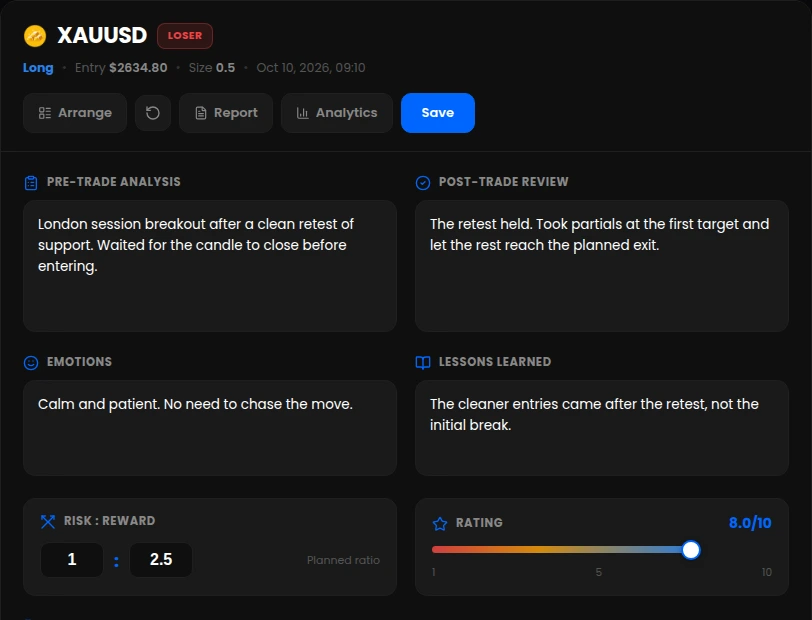
Use TradeFXBook's pre-trade analysis, post-trade notes, emotions and lessons to explain the decision. A screenshot can show the setup you saw, while a tag can make the trade easier to group at review time. The view below illustrates that context. You still need to write it; account data alone does not capture what you were thinking.
Trading journal
Keep the setup.
Keep the lesson.
Write pre-trade analysis and post-trade notes, with screenshots and tags to connect your decisions to the result.
Explore the journal →
 ↗
Pay for the work
you will use.
If free account statistics and published results meet your needs, FX Blue Live is a sensible place to stay.
Pro combines MT4/MT5 sync, unlimited history and one AI report per account each week.
Compare the plans →
Separate account statistics from execution review
FX Blue Live provides trading-history analysis, statistics and risk views. If those already answer your questions, staying with the free service is a sensible choice. Add another tool when you can name the review you cannot currently complete.
For example, you might want to distinguish a planned loss from a trade entered outside your rules. In TradeFXBook, keep that explanation with the trade, then use analytics to inspect the results alongside the notes. Free covers up to one month of analytics; paid plans include all timeframes and unlimited trade history.
Sharing and practice have their own requirements
FX Blue Live supports published account results, embedded widgets and headline data through APIs. Those are concrete reasons to keep it if publishing is part of your workflow. TradeFXBook's trade share cards and journal PDF export serve a different kind of sharing need; choose the output your audience actually uses.
Pro and Elite include one AI report per account each week. Elite adds historical replay, unlimited sessions and 50 saved strategies. Test those extra review or practice tasks before using them to justify a paid subscription. This comparison concerns FX Blue Live, rather than making assumptions about every product under the FX Blue name.
Before you switch.
Test the whole routine.
Begin with a useful question: what would I do differently if I also kept a written journal? Choose a recent week, record the context for a few trades and make one review decision from those notes.
- Keep your current account analysis running while you try manual journaling on TradeFXBook Free.
- If notes help and manual entry is the obstacle, check your MT4/MT5 connection on the relevant paid plan. Compare the resulting history with the platform record.
- Review again a week later. Pay only if the journal or its paid tools improve a task you actually repeat.
There is no need to replace a useful published account record just to add notes. Keep FX Blue Live if free statistics and publishing meet the need; consider TradeFXBook when the decision record, AI review or replay becomes a separate requirement.
