Two different
review needs.
Start with the record you need to keep or share; scroll sideways on small screens.
Myfxbook suits a trader who needs to publish an account record with its verification checks. If that is the job, a private journal is not an interchangeable replacement. Free connection methods may already meet your need.
TradeFXBook suits the written review behind the results. It keeps trade notes, screenshots and analytics together, with MT4/MT5 sync on paid plans. Use both when publishing performance and improving the decision record are separate parts of your routine.
| What matters | TradeFXBook | Myfxbook |
|---|
| Starting cost | Free $0: 15 manual trades/month, latest 15 in history | Free Auto Update and EA Publisher connection methods |
|---|
| Paid options | Pro $12.99/month or $128.99/year
Elite $22.99/month or $238.99/year | Paid Live Update, with Single and Flexible subscriptions |
|---|
| MT4/MT5 connections | Pro: 3 auto-synced accounts
Elite: unlimited
Includes prop firm accounts on MT4/MT5 | Server-side Auto Update or Live Update; EA Publisher runs in your trading platform |
|---|
| Review focus | Pre/post trade notes, screenshots, tags and performance analytics | Account performance and public system pages |
|---|
| Published verification | A journal for reviewing your trading decisions | Track Record checks broker history; Trading Privileges checks control of the account |
|---|
Checked 19 October 2026. TradeFXBook prices are USD; annual plans are billed once per year. Myfxbook sources: MT4 connection methods, MT5 connection methods, verification. Exact Live Update prices are not included here. TradeFXBook: plans and limits.
Workflow discussion checked 19 October 2026 against official sources: Myfxbook MT4 connection operation and billing choices; verification scope.
Keep the thinking
with the trade.
If your question is why you entered, what you followed and what you learned, start with the journal.
The connection method affects what you maintain
Myfxbook's Auto Update and Live Update run server-side, while EA Publisher runs inside the trading platform. Its official MT4 instructions say the publisher stops updating when the platform closes and resumes when it reopens. Choose a method you can maintain, rather than treating every connection as the same setup.
Auto Update and EA Publisher are free methods; Live Update is paid. The Single and Flexible subscriptions have different account arrangements. Exact Live Update prices are not compared here, so check the applicable offer before deciding that a paid connection is necessary.
A synced result still needs a written explanation
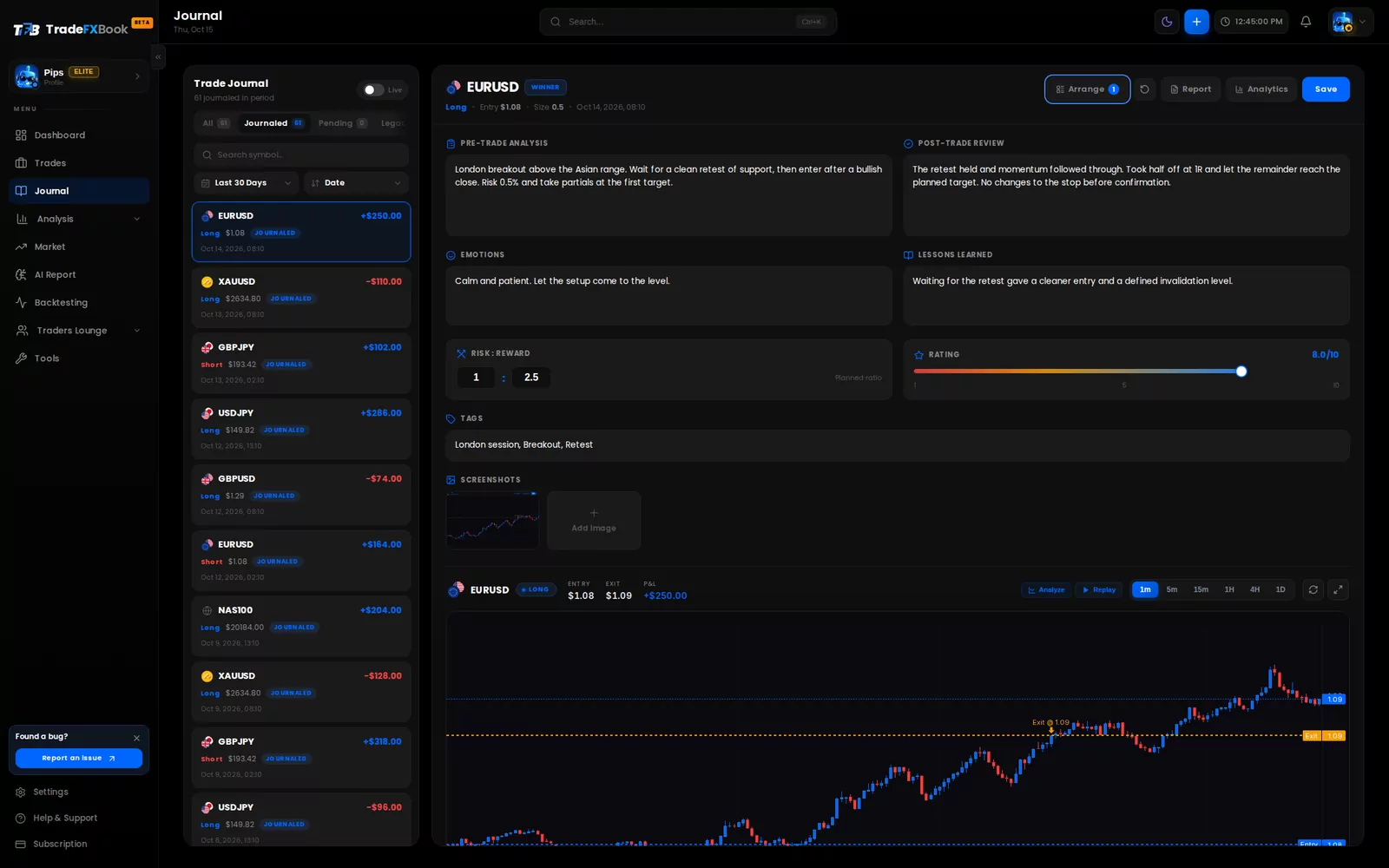
TradeFXBook Pro syncs three MT4/MT5 accounts; Elite supports unlimited accounts. Prop firm accounts on those platforms use the same flow. Once the trades are present, add the setup, screenshot and review that explain the decision. The view below shows where those notes sit alongside a trade rather than on a public performance page.
Trading journal
Write the reason.
Review the result.
Keep notes, screenshots, tags and a rating with each trade; enter manually on Free or sync MT4/MT5 on paid plans.
See the journal →
 ↗
Choose the tool
for the question.
Myfxbook's verification process is a reason to choose it when you need a public system page.
Keep trade context beside the results, and Myfxbook too if publishing a verified record serves a separate purpose.
Explore the analytics →
Verification answers a particular question
Myfxbook's Track Record check concerns whether the displayed history matches the broker's history. Trading Privileges concerns control of the account. Those checks are useful when the purpose is sharing a public system page. They do not explain why a trader entered or whether a decision followed the trader's plan.
For that second question, write what you intended before the trade and what happened afterwards. In TradeFXBook, notes, tags, screenshots and a rating provide that context. Review them alongside the performance analytics so that a good outcome does not automatically become a good decision.
Pay for another review job only if you need it
TradeFXBook Pro adds unlimited history, all analytics timeframes and one weekly AI report per account. Elite adds historical replay, unlimited practice sessions and 50 saved strategies. These are reasons to consider a journal subscription if written review or practice is missing from your routine. They are not reasons to discard a Myfxbook public record that already serves its purpose.
Free TradeFXBook is manual, with 15 entries per month and the latest 15 in history. It can test the note-taking workflow, but paid plans are required for its MT4/MT5 sync.
Before you switch.
Test the whole routine.
Decide what you are trying to replace before moving anything. If other people use your public system page, preserve that record while you test a journal. You may only need to add a written review rather than change your publishing setup.
- Keep your account statements and existing notes. Test the new connection against one ordinary week of platform history.
- Write a review of a winner and a loser. Check whether the notes reveal something you cannot learn from the account total alone.
- Return the following week and find those decisions again. Keep the extra tool only if that review is useful enough to maintain.
Choose Myfxbook for its verified public account workflow. Choose TradeFXBook for the journal and its paid review tools. If you retain both, give each a clear job so that maintaining two tools does not become another reason to postpone the review.
