
TradeFXBook journalKeep the reason
Keep the reason
with the result.
Pre-trade notes, post-trade review, screenshots and tags give a weekly review something specific to revisit.
See the journal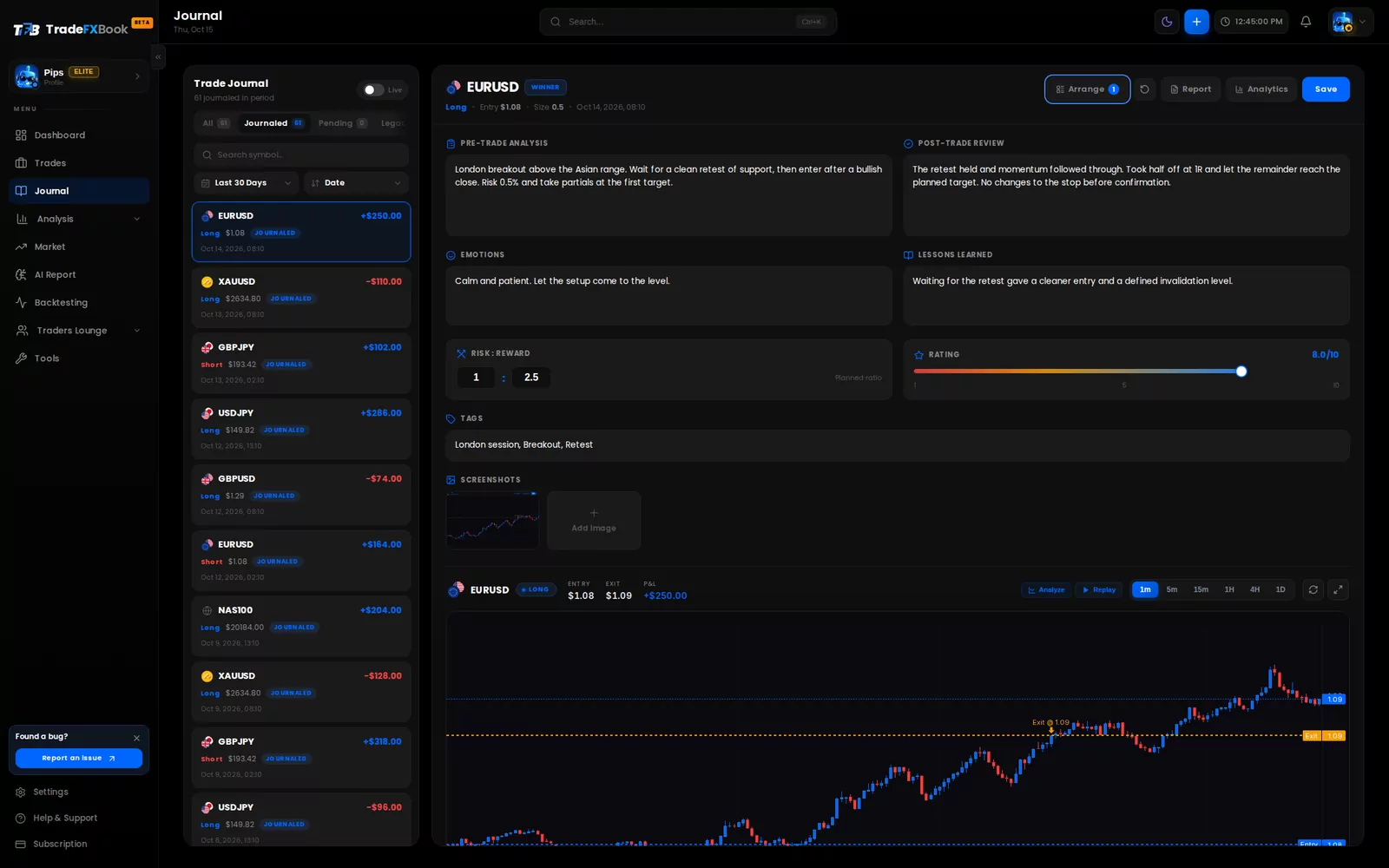
Forex journals and review tools
Need trade notes, a verified record or historical practice? Those are different jobs. Start with the one you need to do, then choose a tool that fits your platform and budget.
Find a trade, read the context and decide what you would repeat or change.
Start with the question your current record cannot answer. A journal records the thinking behind a trade. Account analytics help you inspect performance. A verified public record helps you share account history. Replay gives you a way to practise decisions on historical prices. One tool does not have to do all four jobs.
For an MT4/MT5 journal with weekly AI reports, shortlist TradeFXBook Pro. For broader platform coverage, look at TradeZella or TraderSync. For dedicated psychology review, consider Edgewonk; for a mentor workflow, consider Tradervue. The tables below explain why each belongs on the shortlist, with prices and limits to check before paying.
Compare replay tools by the history, practice workspace and session records you need.
Historical practiceWe make TradeFXBook; compare these picks by use case, and scroll tables sideways on small screens.
List every platform you trade before comparing reports. TradeFXBook Pro connects three MT4/MT5 accounts, including prop firm accounts on those platforms; Elite supports unlimited accounts. TradeZella also lists cTrader and Interactive Brokers. TraderSync covers several markets, but its connection method needs checking for your platform. Broader coverage is a good reason to pay more when it avoids leaving part of your trading outside the review.
TradeFXBook's paid plans include one AI report per account each week. Use it alongside the trade notes and analytics to investigate patterns and set a next step. AI is useful only if you check the record behind the conclusion. It does not replace writing why you entered or whether you followed your rules.
Edgewonk's psychology tools make it a relevant choice when discipline is the main problem. Tradervue's mentor access makes sense when another person regularly reviews your trades. TradeZella's mentoring access varies by plan. Preserve a review arrangement that works rather than switching only because another journal has a lower entry price.
| Best for | Journal and cost | What to weigh |
|---|---|---|
| MT4/MT5 journaling with weekly AI reports | TradeFXBook Free $0 Pro $12.99/month or $128.99/year | Pro syncs 3 MT4/MT5 accounts, including prop firm accounts. Free is manual, with 15 trades/month and the latest 15 in history. |
| Broader platform coverage and mentoring | TradeZella Essential $35/month Pro $59/month Ultra $99/month | Lists MetaTrader, cTrader and Interactive Brokers. Essential covers one trading account; Mentor Mode and Spaces access varies by plan. |
| A journal with multi-market replay | TraderSync Pro $29.95/month Premium $49.95/month Elite $79.95/month | Supports forex alongside stocks, options, futures and crypto. Replay precision and tools depend on the plan; check your connection method. |
| Psychology and trading discipline | Edgewonk $197 per 12 months VAT calculated at checkout | Dedicated psychology analysis, missed-trade tracking and a Tiltmeter for rule-breaking. An annual commitment suits traders who will use that structure. |
| Reviewing trades with a mentor | Tradervue Silver $29.95/month Gold $49.95/month | Both plans include unlimited mentors and mentees. Gold adds exit performance analysis. Its platform directory includes MT4, MT5 and Interactive Brokers. |
Checked 19 October 2026. USD. Monthly prices are shown unless an annual total is stated; annual plans are paid upfront. Sources: TradeZella plans and connections; TraderSync plans and connections; Edgewonk plans and features; Tradervue plans and platforms. TradeFXBook: plans and limits.
Free analytics or a workbook may already do the job, so choose a journal when its review workflow earns its place.
Myfxbook is the more relevant option when you want its verified public account record. FX Blue Live is a useful free starting point for account analysis and publishing. A workbook is enough when you keep it current, understand the calculations and can find the notes you need. These are practical alternatives to paying for a journal.
Choose TradeFXBook when the missing job is reviewing the decision behind each result. Pre/post notes, screenshots and tags let you explain the setup and return to it later. Try that habit manually before deciding that sync or an AI report will solve the problem. TradeFXBook Free can test the written workflow, but its 15-entry monthly limit and latest-15 history limit are different restrictions.
If you already publish account results, you may keep that tool and add a journal for your own review. Give each a clear purpose so that maintaining two records does not become unnecessary work.
| Best for | Tool and cost | What to weigh |
|---|---|---|
| Publishing a verified account record | Myfxbook Free MT4/MT5 Auto Update and EA Publisher Paid Live Update | Track Record and Trading Privileges verification support public system pages. Use it when publishing account performance is the priority. |
| Free MT4/MT5 account analysis | FX Blue Live Free | Analyse and publish trading history through publisher tools or account sync. A useful starting point if account statistics are what you need. |
| Your own columns and review method | Spreadsheets Excel for the web is free; Sheets is available with a Google Account | You define the record and calculations. Keep an existing workbook if you maintain it consistently and trust the answers it gives you. |
Checked 19 October 2026. Sources: Myfxbook MT4 methods, MT5 methods and verification; FX Blue Live; Excel for the web; Google Sheets. No desktop spreadsheet licence, paid template or add-on is assumed. Myfxbook Live Update prices are not included.
Replay helps you test decisions on past prices, with history, tools and record-keeping to suit your routine.
Choose a practice tool around the symbol, interval, historical period and record you want to keep. FX Replay Beginner offers a free way to try dedicated replay, with its session and retention limits. Forex Tester desktop belongs on the shortlist when you want a Windows testing environment and its strategy tools. TradingView is a sensible first check if its charts are already part of your routine.
TradeFXBook Elite is a fit when saved practice sessions and an MT4/MT5 journal are both requirements. It keeps practice and connected-account records separately in the same app. Review the session trades and statistics, then compare your live execution on its own terms. Simulated results should not be read as live account performance.
Compare the paid tier required for the experiment. A monthly figure under annual billing means an upfront annual purchase; a software licence may also involve a data package. A free trial or limited free plan is useful for testing the workspace, but check whether its retained record fits your later review.
| Best for | Tool and cost | What to weigh |
|---|---|---|
| Saved practice alongside an MT4/MT5 journal | TradeFXBook Elite $22.99/month or $238.99/year | Unlimited replay sessions, 50 saved strategies and unlimited MT4/MT5 connections. Practice sessions and connected-account trades have separate records in the same app. |
| Trying dedicated replay for free | FX Replay Beginner $0 Intermediate $180/year Pro $350/year | Beginner includes 2 sessions with 1 week of data retention. Intermediate allows 10 sessions; Pro removes session limits and adds seconds-level data. |
| Desktop testing and strategy tools | Forex Tester desktop One-time software licence Optional Super Data purchases | Windows application with Easy Forex Builder and Strategy Optimizer. Basic Data is included; compare the full licence and data package before buying. |
| Practice in your existing chart setup | TradingView Bar Replay Basic $0 Essential $12.95/month with annual billing | Replay history depends on the plan, symbol and interval. Replay Trading supports simulated orders; export results for later review. |
Checked 19 October 2026. USD where a price is listed. Annual plans are paid upfront. Sources: FX Replay plans and plan limits; Forex Tester licence and data packages and Windows and strategy tools; TradingView annual-billing offer, replay history and Replay Trading and exports. Forex Tester prices vary by regional offer. Tax may apply to competitor purchases. TradeFXBook: plans and limits.
Test a complete review before committing to a new routine.
A useful comparison begins with a small, representative sample. Include a winner, a loser and a trade whose execution you found difficult. Keep your existing notes and statements while you try a candidate; verify migration separately rather than assuming a broker connection will transfer written history.
The example journal below illustrates the second step: the reason and review stay with the trade. This is the work to test before deciding whether a particular dashboard, AI allowance or replay tier is worth paying for.
Pre-trade notes, post-trade review, screenshots and tags give a weekly review something specific to revisit.
See the journal
Choose by job. TradeFXBook Free tests manual journaling within its trade and history limits. FX Blue Live offers free account analysis. A workbook can support your own review format. Use the table for the tool that matches the record you need before paying for extra features.
No. Check the official setup instructions for your exact platform. An automatic connection and a file import involve different work. Reconcile a small sample against the platform history before trusting the new record.
First check that you can keep a reliable trade record and use the analytics. Then test whether the report helps you identify a specific question or next step. TradeFXBook Pro and Elite include one report per account each week. Compare the allowance and review cadence you will actually use.
Only if historical practice is part of your routine and your existing tools do not cover it. Test the symbol, interval, dates and saved results you need. TradeFXBook backtesting is included on Elite; Free is a manual journal and Pro adds sync and AI reports.
Keep your original history and notes until the new workflow is proven. Verify import and migration options separately, including screenshots and written context. A successful account connection does not establish that every part of an older journal will transfer.
Start free. Upgrade when you need more.