What you get.
What you pay.
Compare plans for your routine; scroll sideways on small screens.
A workbook is a sensible choice when its record is current and its calculations answer your review questions. You control the structure and can keep using software you already have. Another subscription needs to solve a specific problem to earn its place.
TradeFXBook suits a trader who wants less workbook maintenance and a defined journal workflow. Pro adds MT4/MT5 sync and all analytics timeframes; Elite adds replay. Start by deciding whether entry, notes or analysis is the part of your current process that needs help.
| Feature or plan | TradeFXBook | Excel / Google Sheets |
|---|
| Starting cost | Free $0, with 15 manual trades per month | No added journal subscription if you use software you already have |
|---|
| Paid journal | Pro $12.99/month or $128.99/year
Elite $22.99/month or $238.99/year | Software, templates or add-ons may have their own costs |
|---|
| Trade entry | Manual on Free; MT4/MT5 auto-sync on Pro and Elite | Enter rows, import a file or maintain your own automation |
|---|
| Trade history | Free: latest 15 trades
Pro and Elite: unlimited | You manage the record in your workbook |
|---|
| Notes and structure | Pre/post notes, screenshots, tags and a rating | Choose your own columns, notes and file links |
|---|
| Performance review | Statistics and charts; all timeframes on paid plans | Build the formulas, charts and summaries you need |
|---|
| Strategy practice | Historical replay and unlimited sessions on Elite | Record test results in your own format; arrange replay separately if needed |
|---|
Checked 18 October 2026. This compares a workbook you maintain with TradeFXBook's published plans. It does not assume a particular spreadsheet licence or paid template. TradeFXBook plans: pricing and limits.
Workflow discussion checked 19 October 2026 against official sources: Excel for the web availability; Google Sheets availability.
Give every trade
some context.
A spreadsheet is enough when you keep it current, your notes are easy to find and your weekly review is working.
Count the work between a trade and a usable record
In a workbook, you decide how rows arrive and how to keep them consistent. Check the fields you rely on: account, symbol, direction, size, entry, exit and costs. If you import a file, make sure a second import does not accidentally count the same trade twice. If you enter rows manually, give that task a regular place in your day.
TradeFXBook Free is also manual, so it is a way to test the journal rather than a promise to remove data entry. Paid plans add MT4/MT5 auto-sync, including prop firm accounts on those platforms. Compare that with the work your own account routine actually requires.
Keep the explanation easy to find
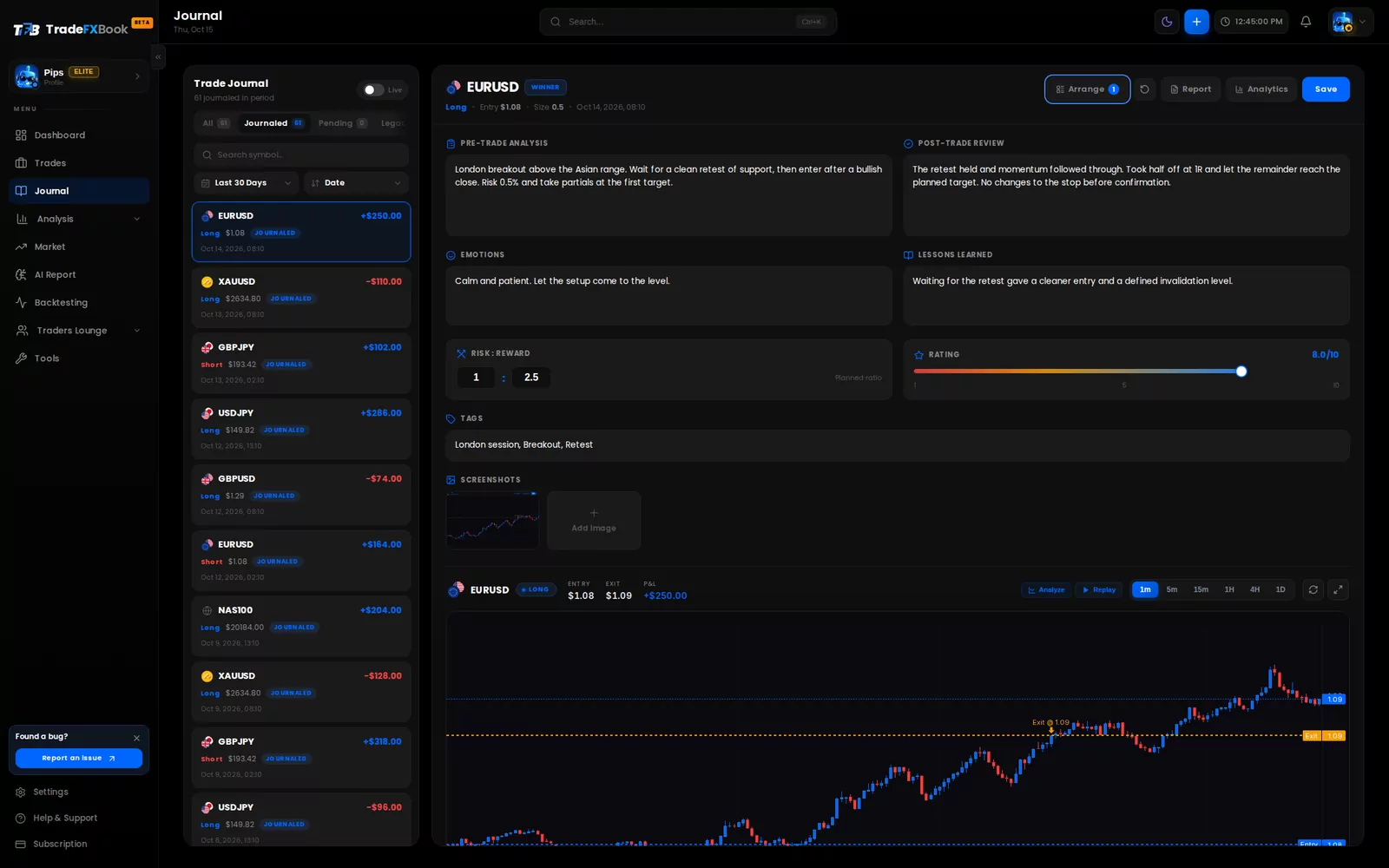
With a spreadsheet, choose columns for the setup and review, plus a consistent way to link screenshots. TradeFXBook keeps pre/post notes, tags, screenshots and a rating with the trade. The view below shows how those fields can explain why a trade was taken. Use whichever format you can return to a week later without searching through unrelated files.
Trading journal
Keep the reason
beside the result.
Keep pre-trade analysis, post-trade review, screenshots and lessons with each trade instead of scattering them across tabs and folders.
See the trading journal →
 ↗
Choose how much
you want to build.
- Excel and Google SheetsA spreadsheet gives you control over the calculations and layout.
- TradeFXBookReview equity, win rate, profit factor and performance breakdowns; Free covers one month, while paid plans include all timeframes.
Test the calculation before trusting the chart
Here is a worked example, not a product result: suppose four trades finish at +$100, +$50, -$75 and -$25 after costs. Total P&L is $50, win rate is 50%, and profit factor is $150 divided by $100, or 1.5. A workbook using the same four results should reach those totals. Check the input rows and cost treatment if it does not.
TradeFXBook provides performance statistics and charts rather than asking you to build those summaries. Free covers analytics up to one month; paid plans include all timeframes. A custom workbook remains useful if you need a particular calculation or layout that your existing method already handles well.
AI and replay are separate reasons to pay
TradeFXBook Pro and Elite include one AI report per account each week. Elite adds historical replay, unlimited sessions and 50 saved strategies. Compare those with the tasks you would otherwise arrange separately. A workbook can remain the place where you record an experiment, even if practice happens in another tool.
Excel for the web is available free, and anyone with a Google Account can create Sheets. That does not assume a desktop licence, paid template or add-on. Compare the cost of your actual setup with the paid journal plan you need.
Before you switch.
Test the whole routine.
Keep the workbook and test a small sample before replacing it. Define the columns you want to keep, save the original file and write down which review questions it already answers well.
- Try a few representative trades in TradeFXBook Free. Include notes and a screenshot so the test covers context as well as entry.
- If sync is the reason to move, verify your MT4/MT5 connection on the relevant paid plan. Do not assume an existing workbook can be imported wholesale.
- Compare one weekly review in each format. Measure the maintenance you actually remove, then decide whether the subscription is worthwhile.
You can keep your own analysis alongside the journal: TradeFXBook exports trades as CSV or Excel, using the selected filters, sort and visible columns. Keep the spreadsheet if it remains the clearest way to answer your specific questions.
