What you get.
What you pay.
Compare plans for your routine; scroll sideways on small screens.
TradeFXBook suits an MT4/MT5 trader who wants a personal review routine built around trade notes, analytics and weekly AI reports. Paid plans add sync; Elite also includes replay.
Tradervue is a stronger candidate when the person reviewing your trades is part of the decision. Its mentor access and Gold exit analysis can justify the higher monthly cost. If your current mentor workflow works, include the cost of disrupting that routine in your choice.
| Feature or plan | TradeFXBook | Tradervue |
|---|
| Monthly billing | Free $0
Pro $12.99
Elite $22.99 | Silver $29.95
Gold $49.95 |
|---|
| Trade history | Free: latest 15 trades
Pro and Elite: unlimited | Silver and Gold: unlimited trade imports |
|---|
| Trading accounts | Pro: 3 MT4/MT5 connections
Elite: unlimited | Silver and Gold: unlimited |
|---|
| Supported platforms | MT4, MT5 and prop firm accounts on paid plans | Includes MT4, MT5, Interactive Brokers, DAS Trader Pro and NinjaTrader |
|---|
| Chart and report review | Equity curve, win rate, profit factor and trade breakdowns | Advanced reporting on Silver; exit performance analysis on Gold |
|---|
| Review with others | Community chat and trade rooms on Pro and Elite | Unlimited mentors and mentees on Silver and Gold |
|---|
| Written journal | Pre/post notes, tags and screenshots | Trade notes, tags and image uploads |
|---|
Checked 18 October 2026. USD. Tradervue prices shown are monthly. Connection methods depend on the platform. Tradervue pricing, supported platforms, journal features. TradeFXBook plans: pricing and limits.
Workflow discussion checked 19 October 2026 against official sources: Tradervue reporting, mentor access and plans; platform setup instructions.
Tradervue lists platforms including Interactive Brokers, DAS Trader Pro and NinjaTrader.
Check the route from platform to journal
Tradervue's directory includes MT4, MT5, Interactive Brokers, DAS Trader Pro and NinjaTrader, with platform-specific setup instructions. Use those instructions to check the connection method you will maintain. A listed platform does not, by itself, mean every record arrives through the same kind of sync.
TradeFXBook's connected flow covers MT4 and MT5, including prop firm accounts on those platforms. Pro supports three accounts and Elite supports unlimited accounts. Enter trades manually on Free if you want to test the journal first, remembering that Free shows only the latest 15 trades and accepts 15 entries per month.
Build a record someone can review
Both products support written context: Tradervue lists trade notes, tags and image uploads; TradeFXBook keeps pre/post notes, tags and screenshots with each trade. Before a review, explain the intended setup and the actual execution. A reviewer should be able to understand the decision without reconstructing it from the P&L alone.
Connected accounts
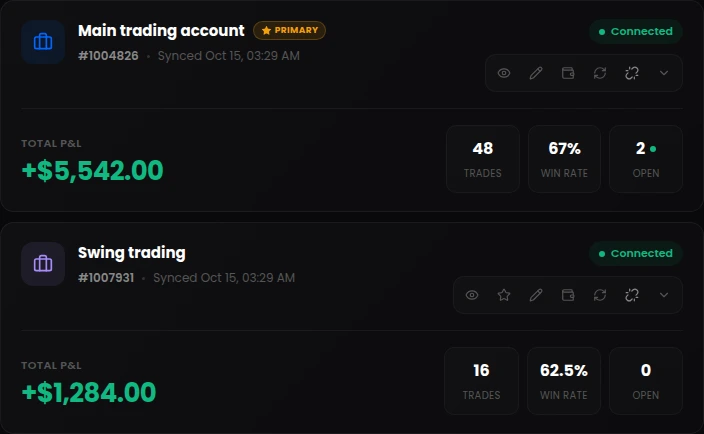
Pro: three MT4/MT5 accounts. Elite: unlimited. Both include unlimited history and support MT4/MT5 prop firm accounts.
See supported connections →
 ↗
Choose your
review routine.
- Tradervue Silver and GoldTradervue Silver and Gold include unlimited mentors and mentees.
- TradeFXBookReview statistics and equity; Pro and Elite include one weekly AI report per account, with patterns and an action plan.
Mentor access and community discussion are different workflows
Tradervue Silver and Gold include unlimited mentors and mentees. If you have a specific person reviewing your trades, try the complete handoff with them before switching. TradeFXBook Pro and Elite include community chat and trade rooms, but that should not be taken as an identical mentor relationship or access model.
Choose the analysis that answers your question
Tradervue Silver includes advanced reporting; Gold adds exit performance and maximum potential P&L analysis. Gold is worth investigating when your recurring question is how you manage exits. Paying for that depth makes less sense if you rarely use it.
TradeFXBook's analytics include equity, win rate, profit factor and trade breakdowns. Paid plans add all analytics timeframes and one weekly AI report per account. Use the report's patterns and action plan as a starting point, then open the trades behind the conclusion. Elite adds historical replay if you want to practise a decision separately from your live record.
Compare the plan you need for that review. A lower monthly price is useful only if you can still perform the analysis or feedback session that prompted the purchase.
Before you switch.
Test the whole routine.
Begin with the review you already do. If a mentor uses Tradervue, ask them to walk through one ordinary review with you before deciding to move. Preserve the parts that make feedback specific and easy to act on.
- Keep a copy of the existing trade history, screenshots and written notes. Check whether those notes can move; do not infer migration support from a broker connection.
- Try a week of trades in the new workflow. Reconcile the record, apply your usual tags and write a short review of two decisions.
- Compare the required report and account limits. Choose Gold for its exit analysis only if that analysis is part of your actual review.
TradeFXBook is a reasonable fit when the review is personal, the accounts are MT4/MT5 and its built-in analytics meet the need. A working mentor routine is a practical reason to stay with Tradervue.
