Practice and review.
Compare the workflow.
Both support simulated trading on historical charts; scroll sideways on small screens.
TradingView Bar Replay is a sensible first option when you already use its chart workspace. Check that the history and intervals available on your plan cover the practice you want to do before paying for another tool.
TradeFXBook Elite suits a trader who wants to return to saved practice sessions alongside an MT4/MT5 journal. The reason to add it is that record and review workflow, rather than assuming that TradingView cannot place simulated trades.
| What matters | TradeFXBook Elite | TradingView Bar Replay |
|---|
| Price and billing | $22.99/month
or $238.99/year | Basic $0
Published rates with annual billing:
Essential $12.95/month
Plus $29.95/month
Premium $59.95/month
Ultimate $199.95/month |
|---|
| Historical practice | Replay controls and simulated trades | Bar Replay with a separate Replay Trading mode for simulated orders |
|---|
| Review after practice | Saved backtesting sessions, trades and performance statistics | Session trade results are not saved automatically; performance and trade lists can be exported |
|---|
| Historical data access | Select the symbol and dates for a backtesting session | Daily and higher timeframes on all plans; intraday depth depends on plan, symbol and interval |
|---|
| Practice tools | Unlimited sessions, 50 saved backtest strategies | Replay works with drawings, indicators and synchronised charts |
|---|
| Connected-account journal | Unlimited MT4/MT5 accounts, including prop firm accounts, with trade notes and screenshots | Bar Replay focuses on historical chart practice |
|---|
Checked 19 October 2026. USD. TradingView rates shown are the published annual-billing offers, not monthly subscription prices; tax may apply. Annual plans are paid upfront. Official sources: TradingView plans, Bar Replay tools, Replay Trading and exports, historical data limits. TradeFXBook: plans and limits.
Workflow discussion checked 19 October 2026 against official sources: TradingView Replay Trading, Paper Trading and result exports; replay history limits; Bar Replay tools; annual-billing rates.
Start with
your existing charts.
TradingView is a sensible first choice if you already use its chart tools and its replay history covers the period you want to practise.
Use the correct trading mode
TradingView's Replay Trading places simulated orders on historical data. It is separate from Paper Trading, whose orders use real-time data even while a chart is in replay. Select the mode that matches your experiment before recording results, or you may be practising something different from the historical decision you intended.
Bar Replay works with drawings, indicators and synchronised charts. That familiar chart setup is a reason to stay if it already supports your process. Check the exact symbol, interval and historical period: intraday depth depends on the plan, symbol and interval, while daily and higher timeframes are available on all plans.
Decide how you will keep the results
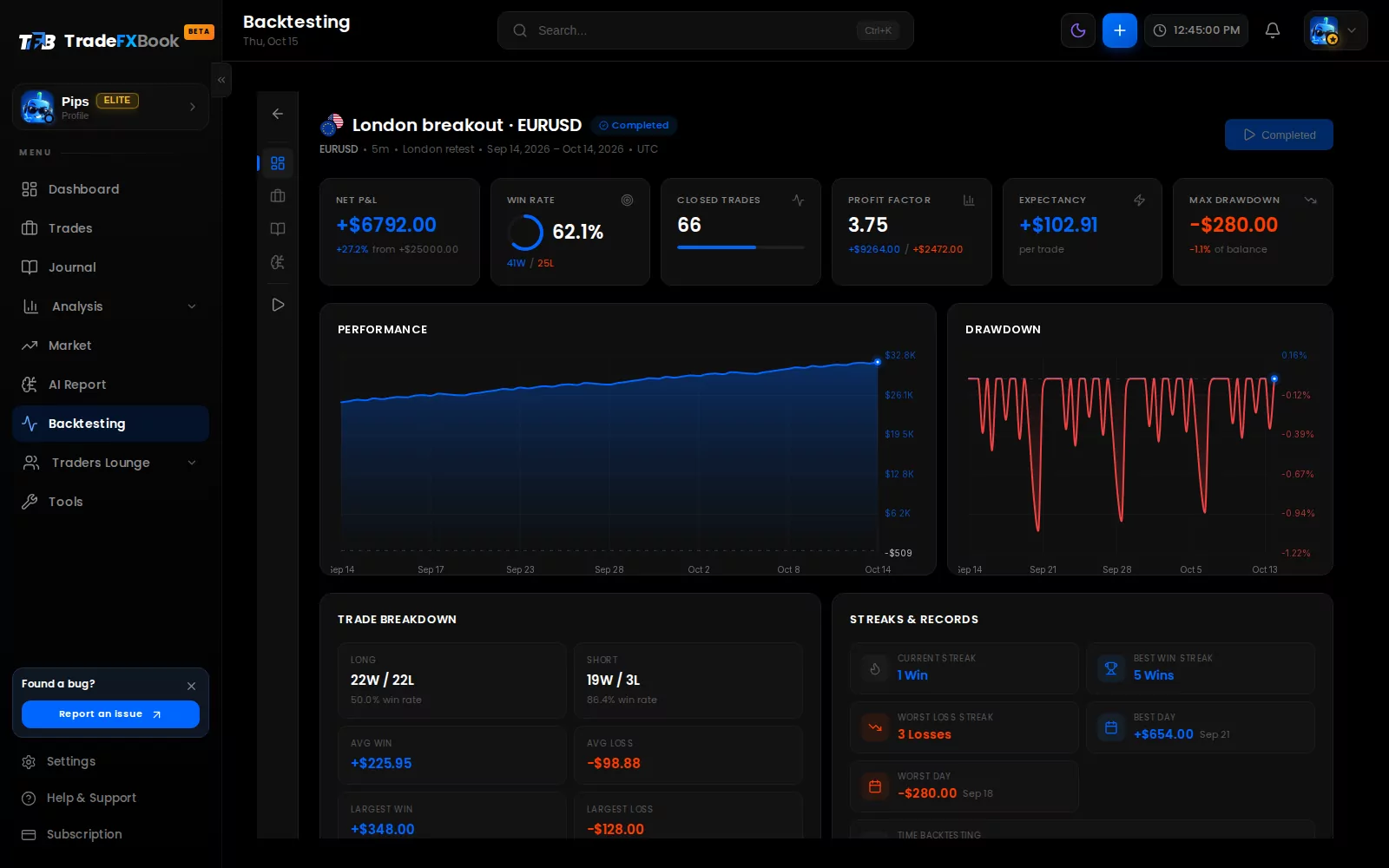
TradingView says session trade results are not saved automatically; export the performance and trade lists for a later review. Make that export part of finishing the session. TradeFXBook saves backtesting sessions, trades and performance statistics. The view below shows the session report you can return to after practice.
TradeFXBook session review
Keep your
practice record.
Save sessions, simulated trades and performance statistics for a later review.
See session review →
 ↗
Keep practice
within reach.
TradeFXBook Elite puts saved replay sessions and your connected-account journal in the same app, with separate records for each.
Elite includes replay, simulated trades, session statistics, unlimited sessions, 50 saved strategies and unlimited MT4/MT5 journal connections.
Explore backtesting →
A replay result and a live journal answer different questions
A practice record explains what happened when you applied rules to historical prices. A live journal also needs the decisions and context of the trades you actually took. Keep the two records distinct when judging how well a strategy and its execution are working.
TradeFXBook Elite includes unlimited MT4/MT5 connections, including prop firm accounts on those platforms. Pre/post notes, screenshots and tags add context to those trades. Its saved practice sessions remain separate from the connected-account journal, even though both are in the same app.
Compare the billing basis and the review job
The TradingView rates in the table are annual-billing offers, not monthly subscription prices. Compare the upfront amount and the plan required for your historical data needs. If your existing chart subscription already covers the experiment, the relevant question is what additional work another subscription would do.
TradeFXBook Elite is $22.99/month or $238.99/year, with unlimited practice sessions and 50 saved strategies. Pro and Elite include one AI report per account each week for journal review. Choose Elite for the combination when you will use it; choose Pro if connected journaling is the need and your current replay workflow already works.
Before you switch.
Test the whole routine.
Try a complete session before deciding that you need another subscription. Choose an unfamiliar historical period, apply a written entry and exit rule, then make a review you can understand a week later.
- Confirm the symbol, interval and history depth on the plan you intend to use.
- In TradingView, use Replay Trading and save the exported results before leaving. In TradeFXBook, finish the session and find its saved report again.
- Compare how easily you can explain one mistake and plan the next experiment. Test the live journal separately if that is part of the purchase.
Stay with Bar Replay if the chart tools, available history and exported record support that process. Add TradeFXBook Elite when saved sessions and a connected-account journal remove work you are currently struggling to maintain.
